Choosing the right internet speed for IPTV is the difference between flawless playback and constant buffering. If your streams keep stalling, you’re probably asking one simple question: what internet speed do I need for IPTV? The short answer is that a single HD stream runs smoothly on 15–25 Mbps, while each 4K stream needs 25 Mbps or more. Standard definition gets by on as little as 5–8 Mbps.
But speed is only half the story. The right internet speed for IPTV matters, yet a stable connection matters just as much as a fast one — and that’s where most people go wrong. Bandwidth, latency, and consistent throughput all shape how smoothly your live TV streams play.
In this guide, we’ll break down the exact speed you need for every quality level, show you how to test your connection properly, and explain why IPTV still buffers even when your internet looks fast. By the end, you’ll know precisely what your setup needs.
Let’s get into it.
Table of Contents
- What Internet Speed Do You Need for IPTV?
- Minimum Speed for SD, HD, Full HD, and 4K IPTV
- How to Test Your Internet Speed
- Why IPTV Buffers Even With Fast Internet
- Wi-Fi vs Ethernet for IPTV
- How to Improve IPTV Streaming Performance
- Common Internet Speed Mistakes
- Frequently Asked Questions
- Conclusion
What Internet Speed Do You Need for IPTV?
Here’s the direct answer: for comfortable IPTV viewing, you need at least 25 Mbps. That covers a single 4K stream or several HD streams at once, with a little room to spare. The ideal internet speed for IPTV depends on your resolution and how many devices share the line, so always plan for a margin above the minimum. If you’re still shopping around, our guide to the best IPTV services in 2026 can help you pick a reliable provider.
If you only watch in HD, 15–25 Mbps is plenty. If you stream in 4K, or run more than one TV at a time, aim higher.
Internet Speed for IPTV: Key Takeaways
- SD streaming: 5–8 Mbps is the minimum internet speed for IPTV in standard definition.
- HD & Full HD: 12–25 Mbps keeps 720p and 1080p streams smooth.
- 4K Ultra HD: 25 Mbps or more per stream, with 35–50 Mbps recommended.
- Multiple streams: add up each stream and leave headroom for other devices.
- Stability over speed: a steady, low-latency connection beats a fast but unreliable one every time.
Why the range? Because the internet speed for IPTV you actually need depends on three things:
- The quality you watch — 4K demands far more than SD.
- How many streams run at once — every extra TV adds to the total.
- What else uses your connection — gaming, downloads, and video calls all compete for bandwidth.
So the honest answer to “how much internet speed does IPTV need” isn’t a single number. It’s a baseline you adjust for your household.
As a simple rule of thumb, take the speed for one stream and multiply by the number of streams, then add a buffer for everything else online. We’ll put exact figures in the table below.
One more thing to remember: your IPTV bandwidth requirements are about consistency, not just headline speed. A steady 30 Mbps line beats a 200 Mbps line that drops every few minutes. Keep that in mind as you read on.
It’s also worth knowing that the best internet speed for IPTV depends on your connection type, not only the number. Fibre tends to stay stable under load, while older cable or DSL lines can sag during busy evenings. If two connections advertise the same speed, the more stable technology will almost always stream better. So when you compare plans, weigh reliability alongside the megabit figure.
Minimum Speed for SD, HD, Full HD, and 4K IPTV
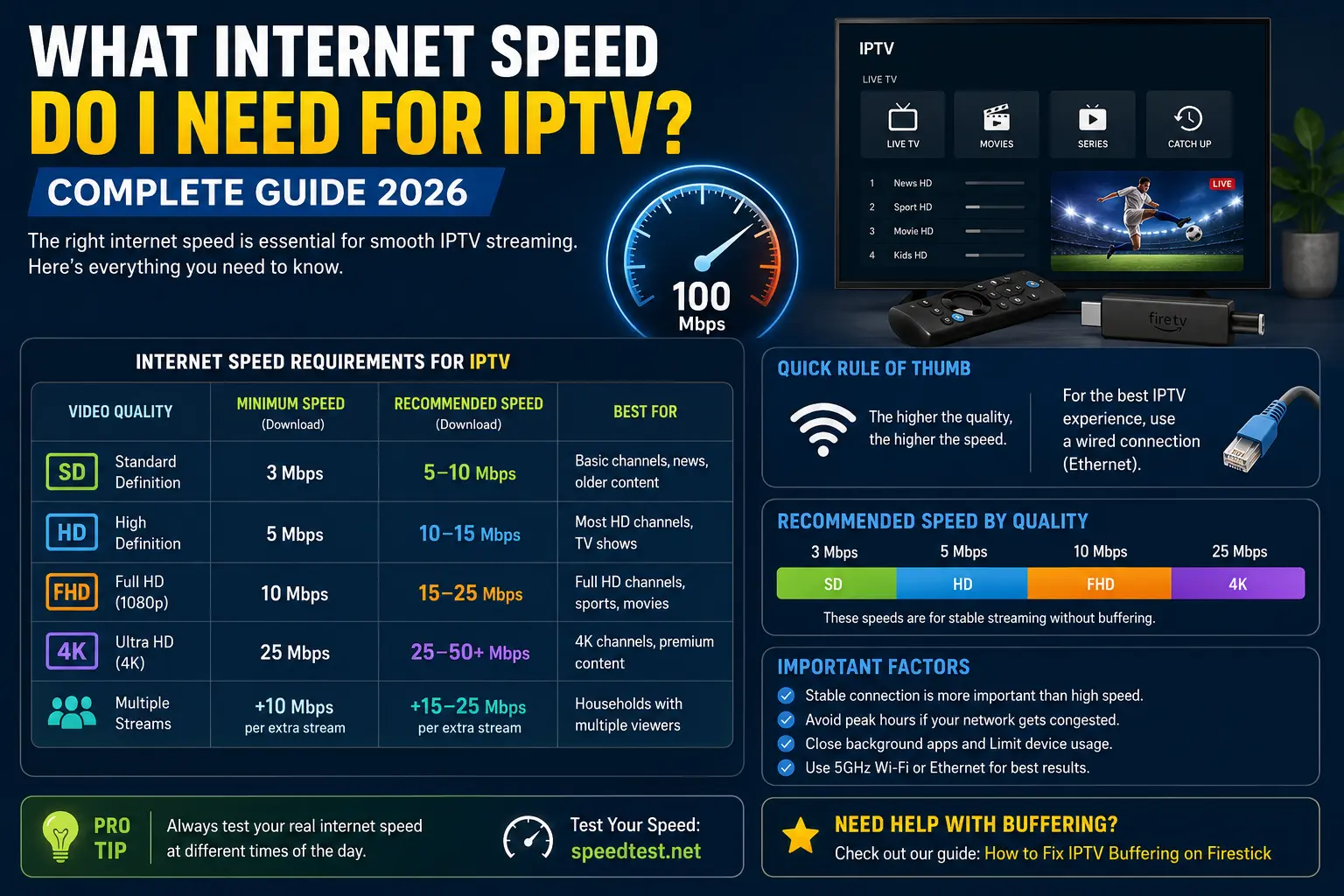
Different video qualities need very different speeds, so the minimum internet speed for IPTV changes with resolution. The higher the quality, the more data your connection has to deliver every second.
The table below breaks down the recommended internet speed for IPTV at each quality level. These figures assume one stream and a stable connection. If 4K is your priority, see our dedicated guide to 4K IPTV streaming for the full picture on Ultra HD playback.
| Quality | Resolution | Minimum Speed | Recommended Speed | Data per Hour |
|---|---|---|---|---|
| SD (Standard) | 480p | 5 Mbps | 8 Mbps | 0.7–1 GB |
| HD | 720p | 8 Mbps | 12 Mbps | 1.5–2 GB |
| Full HD | 1080p | 12 Mbps | 20 Mbps | 2–3 GB |
| 4K (Ultra HD) | 2160p | 25 Mbps | 35–50 Mbps | 5–7 GB |
A few notes to read alongside the table:
- The “minimum” column is the floor, not the target. At minimum speed, you’ll still buffer when your connection dips. Aim for the recommended column.
- 4K is the big jump. It carries roughly four times the data of Full HD, so it punishes weak connections hardest.
- Data adds up fast. If you have a monthly data cap, a few hours of daily 4K can use hundreds of gigabytes a month.
What About Multiple Streams?
If two people watch different channels at once, add the requirements together. Here’s a quick guide to internet speed for multiple IPTV streams:
- Two HD streams: around 30–50 Mbps
- Two 4K streams: around 50–100 Mbps
- A busy family home: 100 Mbps or more for comfort
Always leave headroom. Your phone, laptop, smart speaker, and security camera all use the same pipe.
How to Test Your Internet Speed
Before you blame your provider or buy a faster plan, measure what you actually have. Most people are surprised by the gap between the speed they pay for and the speed reaching their TV.
Follow these steps to run a proper IPTV speed test.
Step 1: Test on the Streaming Device
Run the test on the same device you watch IPTV on, in the same room. Speed at your router means little if the signal drops by the time it reaches your Firestick or smart TV.
Step 2: Use a Trusted Speed Test Tool
Open a reliable tool such as Speedtest by Ookla or the Cloudflare Speed Test. Both are free, accurate, and widely used.
Step 3: Record Three Numbers
Note your:
- Download speed — the main figure for streaming.
- Upload speed — less important for IPTV, but useful.
- Ping / latency — lower is better for a responsive connection.
Step 4: Test During Peak Hours
This step matters most. Run the test again in the evening, between roughly 7 p.m. and 11 p.m., when your whole neighbourhood is online. Peak-hour speed is the speed that decides whether IPTV buffers. A line that hits 100 Mbps at noon but crashes to 10 Mbps at 9 p.m. will stutter during prime time.
Step 5: Run It More Than Once
A single test can mislead you. Run it three or four times and look at the average — and the consistency. Wild swings between tests point to an unstable connection, which causes more buffering than a simply slow one.
Why IPTV Buffers Even With Fast Internet
This frustrates everyone at some point: the speed test says 100 Mbps, yet the stream still freezes. If that’s you, the cause is rarely a lack of internet speed for IPTV — it’s usually something else on your network. For app-specific fixes, see our guide to IPTV apps without buffering. Here’s what’s usually going on.
Your connection is unstable. Speed tests measure a quick burst. If your line drops every few minutes, IPTV buffers even though the average looks fine.
Your Wi-Fi signal is weak. The speed at your router and the speed at your TV are two different things. Walls, distance, and interference all eat into it.
Your device is low on memory. A streaming stick with full storage has no room for the buffer. Clearing the cache often helps more than upgrading your plan.
Your ISP is throttling streams. Some providers deliberately slow streaming traffic. A VPN can help here, since it hides the traffic type.
The provider’s server is overloaded. This is the big one. If only some channels buffer while everything else is smooth, the bottleneck is the provider — not your internet.
For a full walkthrough of every fix, see our detailed guide on how to fix IPTV buffering. It covers each cause in order, from quickest to most advanced.
Wi-Fi vs Ethernet for IPTV
When people ask about Wi-Fi vs Ethernet for IPTV, the answer is clear: Ethernet wins for reliability, Wi-Fi wins for convenience. Your connection type can matter as much as the raw internet speed for IPTV you pay for. On a Firestick in particular, a wired link helps — see our Firestick buffering fix guide for device-specific tips.
A wired Ethernet connection gives your device a direct, stable link to the router. It ignores interference, doesn’t weaken with distance, and keeps latency low. For 4K streams and busy homes, it’s the single most effective upgrade you can make.
Wi-Fi, on the other hand, is flexible and easy. On a strong 5GHz signal close to the router, it streams beautifully. The problems start with distance, walls, and crowded networks.
Here’s how to choose:
- Use Ethernet if you stream in 4K, your device sits near the router, or you’ve fought buffering for weeks. Many streaming sticks support a cheap Ethernet adapter.
- Use Wi-Fi if convenience matters most — but connect to the 5GHz band, not the slower, more crowded 2.4GHz band.
If you can’t run a cable, a mesh Wi-Fi system or a well-placed extender bridges the gap nicely. The goal is a strong, steady signal wherever your TV lives.
How to Improve IPTV Streaming Performance
Suppose your internet speed for IPTV is fine but performance still isn’t. These practical steps squeeze the most out of any connection. If you also need the right app, our IPTV download guide covers the best players for Android, Smart TV, Firestick, and PC.
Switch to a wired connection. As covered above, Ethernet is the gold standard. Try it first.
Move to 5GHz Wi-Fi. It’s faster and far less congested than 2.4GHz. Connect to the network name ending in “5G” if you have one.
Restart your router regularly. A simple reboot clears congestion and often restores full speed. Do it weekly.
Free up device storage. On a Firestick or Android box, clear the app cache and uninstall unused apps. Keep 1–2 GB free at all times.
Close background apps. Downloads, updates, and other streams steal bandwidth. Pause them during peak viewing.
Upgrade your router if it’s old. A router more than five years old may not handle modern speeds or 5GHz well. A newer model can transform performance.
Consider a faster plan only if testing proves it. Don’t pay for more speed until a peak-hour test shows you’re genuinely maxing out your line. Often the fix is stability, not more megabits.
Reduce the stream quality if you must. If your connection simply can’t keep up, dropping a channel from 4K to HD, or HD to SD, instantly lowers the bandwidth it needs. It’s not ideal, but a smooth HD picture beats a stuttering 4K one every time.
If you’re setting up a new device, our guide on how to install IPTV on Firestick walks through a clean setup, and our roundup of the best IPTV players for Firestick covers apps that handle weak connections gracefully.
Common Internet Speed Mistakes
Avoid these common internet speed for IPTV mistakes and you’ll save yourself a lot of frustration — and possibly an unnecessary bill. Pairing the right plan with a solid app from our best IPTV apps for 2026 roundup makes a noticeable difference too.
- Confusing speed with stability. A fast line that keeps dropping buffers more than a slower, steady one. Stability is king.
- Testing only at the router. Always test on the device you stream on, in the room you watch in.
- Testing only at off-peak times. Midday speed means little. Test in the evening, when it counts.
- Ignoring other devices. Your IPTV shares the connection with phones, consoles, and cameras. Account for all of them.
- Using 2.4GHz when 5GHz is available. The older band is slower and crowded. Switch where you can.
- Blaming your internet for a provider problem. If mainstream apps are flawless and only some IPTV channels buffer, the issue is the provider, not your speed.
- Buying a faster plan first. Upgrade last, not first. Most buffering is fixed for free.
Frequently Asked Questions
What internet speed do I need for IPTV?
For IPTV you need around 15–25 Mbps for a single HD stream and 25 Mbps or more for each 4K stream. Standard definition works on 5–8 Mbps. A stable connection matters more than peak speed, so a wired or 5GHz connection beats a faster but congested one.
What is the minimum internet speed for IPTV?
The realistic minimum for watchable IPTV is about 10 Mbps, which handles standard definition and basic HD. Below that, you will see frequent buffering. For comfortable HD viewing, aim for at least 15–25 Mbps.
What internet speed do I need for 4K IPTV?
For 4K IPTV, plan for 25 Mbps or more per stream, with 35–50 Mbps giving a comfortable buffer. 4K carries roughly four times the data of HD, so a stable connection is essential to avoid buffering on Ultra HD channels.
How much data does IPTV use per hour?
IPTV uses roughly 0.7–1 GB per hour for SD, about 1.5–3 GB per hour for HD, and 5–7 GB or more per hour for 4K. Watching several hours of 4K daily can add up quickly, so check your data cap if you have one.
Why does IPTV buffer even with fast internet?
Fast internet can still buffer if the connection is unstable, your Wi-Fi signal is weak, your device is low on memory, your ISP is throttling streams, or the provider’s server is overloaded. Peak speed alone does not guarantee smooth playback.
Is Wi-Fi or Ethernet better for IPTV?
Ethernet is better for IPTV because it gives a stable, interference-free connection with lower latency. Wi-Fi is convenient and fine on a strong 5GHz signal, but a wired connection is the most reliable way to stop connection-related buffering.
What internet speed do I need for multiple IPTV streams?
Add up the requirement for each stream. Two HD TVs need around 30–50 Mbps combined, and two 4K streams need 50–100 Mbps. Always leave headroom for other devices in the home that share the connection.
How do I test my internet speed for IPTV?
Run a speed test on the device you stream on, using a tool like Speedtest by Ookla or Cloudflare. Note the download speed, upload speed, and especially the stability. Test during peak evening hours, since that is when IPTV is most likely to struggle.
Does a VPN slow down IPTV?
A VPN can slightly reduce speed because it encrypts your traffic, but the drop is usually small on a good service. If your ISP throttles streaming, a VPN can actually improve IPTV by hiding the traffic. Choose a fast, nearby server.
Can I run IPTV on slow internet?
Yes, you can run IPTV on slow internet by watching in standard definition, which needs only 5–8 Mbps. You will be limited on HD and 4K, and buffering is more likely at peak times, but basic viewing is possible on around 10 Mbps.
Is 50 Mbps enough for IPTV?
Yes, 50 Mbps is more than enough for IPTV. It comfortably handles a single 4K stream or several HD streams at once, with headroom for other devices. For most households, 50 Mbps gives a smooth, buffer-free experience.
Conclusion
So, what internet speed do you need for IPTV? For most people, 25 Mbps is the comfortable baseline, 15–25 Mbps handles HD, and 4K wants 25 Mbps or more per stream. If several people watch at once, add the streams together and leave headroom for the rest of your home.
Just remember the lesson that trips up most viewers: stability beats raw speed. A steady connection on the 5GHz band — or better still, a wired Ethernet link — will do more to stop buffering than any plan upgrade. Test on your actual device, at peak hours, before you spend a penny.
Get the connection right, and IPTV simply works.
Still buffering after sorting your speed? Read our step-by-step guide on how to fix IPTV buffering, or if you’d like a hand checking your setup, message us on WhatsApp and we’ll help you pin down the cause. New to all this? Start with our explainer on what an IPTV service is.
FAQ Schema (JSON-LD)
Paste this into a Custom HTML block in WordPress, or let the Rank Math FAQ block generate it from the questions above — use one method, not both.
{
  "@context": "https://schema.org",
  "@type": "FAQPage",
  "mainEntity": [
    {
      "@type": "Question",
      "name": "What internet speed do I need for IPTV?",
      "acceptedAnswer": {
        "@type": "Answer",
        "text": "For IPTV you need around 15-25 Mbps for a single HD stream and 25 Mbps or more for each 4K stream. Standard definition works on 5-8 Mbps. A stable connection matters more than peak speed, so a wired or 5GHz connection beats a faster but congested one."
      }
    },
    {
      "@type": "Question",
      "name": "What is the minimum internet speed for IPTV?",
      "acceptedAnswer": {
        "@type": "Answer",
        "text": "The realistic minimum for watchable IPTV is about 10 Mbps, which handles standard definition and basic HD. Below that, you will see frequent buffering. For comfortable HD viewing, aim for at least 15-25 Mbps."
      }
    },
    {
      "@type": "Question",
      "name": "What internet speed do I need for 4K IPTV?",
      "acceptedAnswer": {
        "@type": "Answer",
        "text": "For 4K IPTV, plan for 25 Mbps or more per stream, with 35-50 Mbps giving a comfortable buffer. 4K carries roughly four times the data of HD, so a stable connection is essential to avoid buffering on Ultra HD channels."
      }
    },
    {
      "@type": "Question",
      "name": "How much data does IPTV use per hour?",
      "acceptedAnswer": {
        "@type": "Answer",
        "text": "IPTV uses roughly 0.7-1 GB per hour for SD, about 1.5-3 GB per hour for HD, and 5-7 GB or more per hour for 4K. Watching several hours of 4K daily can add up quickly, so check your data cap if you have one."
      }
    },
    {
      "@type": "Question",
      "name": "Why does IPTV buffer even with fast internet?",
      "acceptedAnswer": {
        "@type": "Answer",
        "text": "Fast internet can still buffer if the connection is unstable, your Wi-Fi signal is weak, your device is low on memory, your ISP is throttling streams, or the provider's server is overloaded. Peak speed alone does not guarantee smooth playback."
      }
    },
    {
      "@type": "Question",
      "name": "Is Wi-Fi or Ethernet better for IPTV?",
      "acceptedAnswer": {
        "@type": "Answer",
        "text": "Ethernet is better for IPTV because it gives a stable, interference-free connection with lower latency. Wi-Fi is convenient and fine on a strong 5GHz signal, but a wired connection is the most reliable way to stop connection-related buffering."
      }
    },
    {
      "@type": "Question",
      "name": "What internet speed do I need for multiple IPTV streams?",
      "acceptedAnswer": {
        "@type": "Answer",
        "text": "Add up the requirement for each stream. Two HD TVs need around 30-50 Mbps combined, and two 4K streams need 50-100 Mbps. Always leave headroom for other devices in the home that share the connection."
      }
    },
    {
      "@type": "Question",
      "name": "How do I test my internet speed for IPTV?",
      "acceptedAnswer": {
        "@type": "Answer",
        "text": "Run a speed test on the device you stream on, using a tool like Speedtest by Ookla or Cloudflare. Note the download speed, upload speed, and especially the stability. Test during peak evening hours, since that is when IPTV is most likely to struggle."
      }
    },
    {
      "@type": "Question",
      "name": "Does a VPN slow down IPTV?",
      "acceptedAnswer": {
        "@type": "Answer",
        "text": "A VPN can slightly reduce speed because it encrypts your traffic, but the drop is usually small on a good service. If your ISP throttles streaming, a VPN can actually improve IPTV by hiding the traffic. Choose a fast, nearby server."
      }
    },
    {
      "@type": "Question",
      "name": "Can I run IPTV on slow internet?",
      "acceptedAnswer": {
        "@type": "Answer",
        "text": "Yes, you can run IPTV on slow internet by watching in standard definition, which needs only 5-8 Mbps. You will be limited on HD and 4K, and buffering is more likely at peak times, but basic viewing is possible on around 10 Mbps."
      }
    },
    {
      "@type": "Question",
      "name": "Is 50 Mbps enough for IPTV?",
      "acceptedAnswer": {
        "@type": "Answer",
        "text": "Yes, 50 Mbps is more than enough for IPTV. It comfortably handles a single 4K stream or several HD streams at once, with headroom for other devices. For most households, 50 Mbps gives a smooth, buffer-free experience."
      }
    }
  ]
}